# Master 2.41.1

Released 20.10.2025

### New features

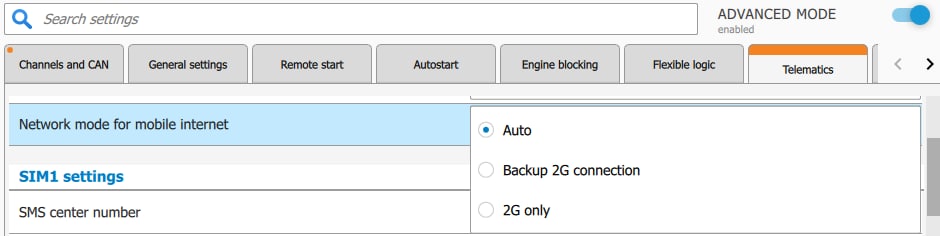
#### <span class="nh-number">1. A setting for network mode has been added to support mobile internet on devices with an LTE modem. </span>

**<span style="color: rgb(0, 0, 0); background-color: rgb(191, 237, 210);"><span class="status-macro aui-lozenge aui-lozenge-success conf-macro output-inline" style="text-decoration: none;"> GEN7</span> <span class="status-macro aui-lozenge aui-lozenge-success conf-macro output-inline" style="text-decoration: none;">S96(V2) </span></span>**

<span style="color: rgb(23,43,77);"><span style="color: rgb(51,50,56);">In "Auto" mode, the modem automatically picks network based on available LTE, 3G, or 2G.</span></span>

<span style="color: rgb(23,43,77);"><span style="color: rgb(51,50,56);">In "2G Backup" mode, in addition to "Auto", program automatically switches the network to 2G for one day when there are mobile internet issues, then switches back to LTE/3G.</span></span><span style="color: rgb(23,43,77);"><span style="color: rgb(51,50,56);"> </span></span>

<span style="color: rgb(23,43,77);"><span style="color: rgb(51,50,56);">In "2G Only" mode, modem works on 2G until the setting is changed.</span></span>

<span style="color: rgb(23,43,77);"><span style="color: rgb(51,50,56);">Settings can be changed in StarLine Master, as well as by SMS command:</span></span>

- 00070 - Network mode "Auto" (default)
- 00071 - Network mode "2G Only"
- 00072 - Network mode<span style="color: rgb(23,43,77);"><span style="color: rgb(51,50,56);"> "Backup 2G connection</span></span>"  
      
    [![Network modes.jpg](https://help.starline.ru/uploads/images/gallery/2025-09/scaled-1680-/network-modes.jpg)](https://help.starline.ru/uploads/images/gallery/2025-09/network-modes.jpg)

### Fixed bugs

No

### Known bugs

1. No

*\**This firmware version is intended for security systems *S96v2 LTE, A97 LTE и B97 LTE* with serial numbers:  
*ES96V2 S..., GEN7 S....*