# Master 2.42.2

### New features

#### <span class="nh-number">1. Added brake or clutch pedal simulation via CAN </span>

<span style="background-color: rgb(191, 237, 210);">**<span class="status-macro aui-lozenge aui-lozenge-success conf-macro output-inline" data-hasbody="false" data-macro-name="status"> GEN7(V2)</span> <span class="status-macro aui-lozenge aui-lozenge-success conf-macro output-inline" data-hasbody="false" data-macro-name="status">E96(V2)</span> <span class="status-macro aui-lozenge aui-lozenge-success conf-macro output-inline" data-hasbody="false" data-macro-name="status">E96(V2)E90L</span> <span class="status-macro aui-lozenge aui-lozenge-success conf-macro output-inline" data-hasbody="false" data-macro-name="status">S96(V2) </span>**</span>

Control is performed in sync with the operation of the analog output.

[![Pedal Pressing simulation.jpg](https://help.starline.ru/uploads/images/gallery/2025-09/scaled-1680-/pedal-pressing-simulation.jpg)](https://help.starline.ru/uploads/images/gallery/2025-09/pedal-pressing-simulation.jpg)

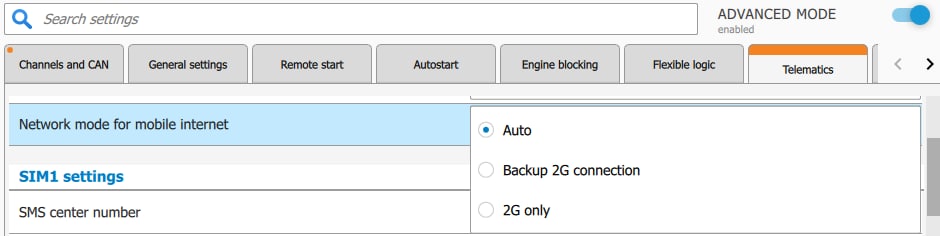
#### 2. A network mode setting was added to support mobile internet on devices with LTE modems. 


<span style="color: rgb(23, 43, 77); background-color: rgb(45, 194, 107);"><span style="background-color: rgb(191, 237, 210);">**<span class="status-macro aui-lozenge aui-lozenge-success conf-macro output-inline" data-hasbody="false" data-macro-name="status"> GEN7(V2)</span> <span class="status-macro aui-lozenge aui-lozenge-success conf-macro output-inline" data-hasbody="false" data-macro-name="status">S96(V2)</span>** </span></span>

<span style="color: rgb(23,43,77);"><span style="color: rgb(51,50,56);">In "Auto" mode, the modem automatically picks network based on available LTE, 3G, or 2G.</span></span>

<span style="color: rgb(23,43,77);"><span style="color: rgb(51,50,56);">In "2G Backup" mode, in addition to "Auto", program automatically switches the network to 2G for one day when there are mobile internet issues, then switches back to LTE/3G.</span></span><span style="color: rgb(23,43,77);"><span style="color: rgb(51,50,56);"> </span></span>

<span style="color: rgb(23,43,77);"><span style="color: rgb(51,50,56);">In "2G Only" mode, modem works on 2G until the setting is changed.</span></span>

<span style="color: rgb(23,43,77);"><span style="color: rgb(51,50,56);">Settings can be changed in StarLine Master, as well as by SMS command:</span></span>

- 00070 - Network mode "Auto" (default)
- 00071 - Network mode "2G Only"
- 00072 - Network mode<span style="color: rgb(23,43,77);"><span style="color: rgb(51,50,56);"> "Backup 2G connection</span></span>"

[![Network modes.jpg](https://help.starline.ru/uploads/images/gallery/2025-09/scaled-1680-/network-modes.jpg)](https://help.starline.ru/uploads/images/gallery/2025-09/network-modes.jpg)

#### 3. Added support for the Webasto Thermo Top Evo 5 preheater with an exhaust gas temperature sensor.

<span style="background-color: rgb(191, 237, 210);">**<span class="status-macro aui-lozenge aui-lozenge-success conf-macro output-inline" data-hasbody="false" data-macro-name="status"> GEN7(V2)</span> <span class="status-macro aui-lozenge aui-lozenge-success conf-macro output-inline" data-hasbody="false" data-macro-name="status">E96(V2)</span> <span class="status-macro aui-lozenge aui-lozenge-success conf-macro output-inline" data-hasbody="false" data-macro-name="status">E96(V2)E90L</span> <span class="status-macro aui-lozenge aui-lozenge-success conf-macro output-inline" data-hasbody="false" data-macro-name="status">S96(V2)</span> <span class="status-macro aui-lozenge aui-lozenge-success conf-macro output-inline" data-hasbody="false" data-macro-name="status">M66(V2)</span>** </span>

Added control and monitoring of Webasto Thermo Top Evo 5 preheater start with an exhaust gas temperature sensor via data bus. The connection is made to the yellow W-Bus wire.

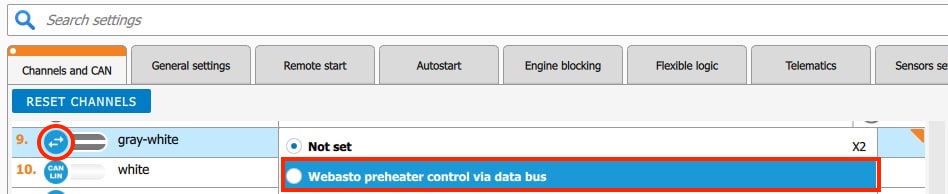
You can use white-black wire or any free LIN wire to make the connection by switching it to a digital channel.

In StarLine Master app, program the chosen channel for the function "Webasto preheater control via data bus"

On the "Remote start" tab, in the "Parking heater (preheater)" section, enable option "Control parking heater (preheater). For the "Start type of preheater" setting, select "Webasto via data bus".

Setting example:

[![Webasto control via data bus.jpg](https://help.starline.ru/uploads/images/gallery/2025-09/scaled-1680-/webasto-control-via-data-bus.jpg)](https://help.starline.ru/uploads/images/gallery/2025-09/webasto-control-via-data-bus.jpg)
[![Webasto via data bus.jpg](https://help.starline.ru/uploads/images/gallery/2025-09/scaled-1680-/webasto-via-data-bus.jpg)](https://help.starline.ru/uploads/images/gallery/2025-09/webasto-via-data-bus.jpg)

### Fixed bugs

1. <span style="background-color: rgb(248, 202, 198);"> **<span class="status-macro aui-lozenge aui-lozenge-error conf-macro output-inline" data-hasbody="false" data-macro-name="status">2.41.0</span>** </span>**<span style="background-color: rgb(191, 237, 210);"> <span class="status-macro aui-lozenge aui-lozenge-success conf-macro output-inline" data-hasbody="false" data-macro-name="status">GEN7(V2) </span></span>** On some VAG vehicles, CAN-FD-B might not work.
2. **<span style="color: rgb(0, 0, 0); background-color: rgb(248, 202, 198);"><span class="status-macro aui-lozenge aui-lozenge-error conf-macro output-inline" data-hasbody="false" data-macro-name="status"> 2.X.X</span> </span>**<span style="background-color: rgb(45, 194, 107);"><span style="background-color: rgb(191, 237, 210);"> **<span class="status-macro aui-lozenge aui-lozenge-success conf-macro output-inline" data-hasbody="false" data-macro-name="status">E96(V2)</span> <span class="status-macro aui-lozenge aui-lozenge-success conf-macro output-inline" data-hasbody="false" data-macro-name="status">E96V2E90L</span> <span class="status-macro aui-lozenge aui-lozenge-success conf-macro output-inline" data-hasbody="false" data-macro-name="status">GEN7(V2)</span>** </span><span class="status-macro aui-lozenge aui-lozenge-success conf-macro output-inline" data-hasbody="false" data-macro-name="status"><span style="background-color: rgb(191, 237, 210);">**S96(V2)** </span></span></span> The reason for the failed auto start by timer was not shown if the temperature at the time was higher than the set limit.

### Known bugs

1. No

*\**This firmware version is intended for security systems with serial numbers:  
GEN7S S..., GEN7E S..., E96V2P S..., ES96P S...,  
**except for** **E96V2L S..., ES96L S..., ES96V2 S..., E96V2 S..., and GEN7 S...**