# Master 2.43.0

Released 03.12.2025

### New features

#### <span class="nh-number">1. **Added coolant temperature via data bus from A100 and Webasto heaters**</span>


<span style="background-color: rgb(191, 237, 210);">**<span class="status-macro aui-lozenge aui-lozenge-success conf-macro output-inline" data-hasbody="false" data-macro-name="status"> GEN7(V2)</span> <span class="status-macro aui-lozenge aui-lozenge-success conf-macro output-inline" data-hasbody="false" data-macro-name="status">AS90</span> <span class="status-macro aui-lozenge aui-lozenge-success conf-macro output-inline" data-hasbody="false" data-macro-name="status">S96(V2)</span> <span class="status-macro aui-lozenge aui-lozenge-success conf-macro output-inline" data-hasbody="false" data-macro-name="status">M66(V2) </span>**</span>

Mobile app now shows coolant temperature for Webasto Thermo Top Evo 5, A100 HYDRO ECO version 2, and A100 HYDRO D5/G5 Eco V3 heaters. This works via the data bus when the heater is running or the ignition is on.

[![image2025-11-24-15-53-53.png](https://help.starline.ru/uploads/images/gallery/2025-12/scaled-1680-/hDximage2025-11-24-15-53-53.png)](https://help.starline.ru/uploads/images/gallery/2025-12/hDximage2025-11-24-15-53-53.png)
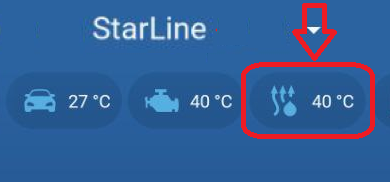
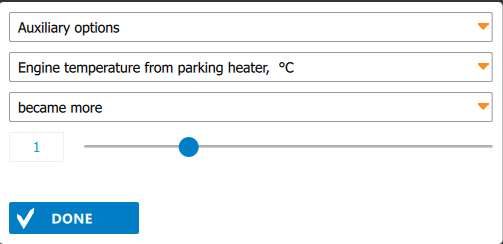
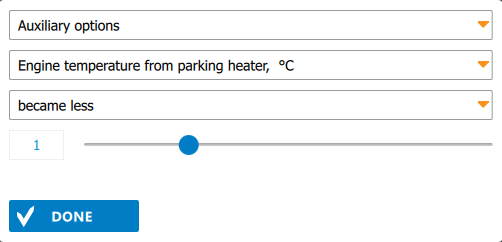
The engine temperature from the heater can now be used in Flexible logic programs as an event or condition.

[![Heater. Tempr became more.jpg](https://help.starline.ru/uploads/images/gallery/2025-12/scaled-1680-/heater-tempr-became-more.jpg) ](https://help.starline.ru/uploads/images/gallery/2025-12/heater-tempr-became-more.jpg)[![Heater. Temperature became less.jpg](https://help.starline.ru/uploads/images/gallery/2025-12/scaled-1680-/Dbgheater-temperature-became-less.jpg)](https://help.starline.ru/uploads/images/gallery/2025-12/Dbgheater-temperature-became-less.jpg)
[![image2025-11-26_17-50-12.png](https://help.starline.ru/uploads/images/gallery/2025-12/scaled-1680-/image2025-11-26-17-50-12.png) ](https://help.starline.ru/uploads/images/gallery/2025-12/image2025-11-26-17-50-12.png)[![image2025-11-26_17-52-21.png](https://help.starline.ru/uploads/images/gallery/2025-12/scaled-1680-/image2025-11-26-17-52-21.png)](https://help.starline.ru/uploads/images/gallery/2025-12/image2025-11-26-17-52-21.png)

#### <span class="nh-number">2. **Added transmission of engine temperature from CAN**</span>

**<span style="color: rgb(23, 43, 77); background-color: rgb(191, 237, 210);"><span class="status-macro aui-lozenge aui-lozenge-success conf-macro output-inline" data-hasbody="false" data-macro-name="status"> GEN7(V2)</span> <span class="status-macro aui-lozenge aui-lozenge-success conf-macro output-inline" data-hasbody="false" data-macro-name="status">M66(V2)</span> <span class="status-macro aui-lozenge aui-lozenge-success conf-macro output-inline" data-hasbody="false" data-macro-name="status">S96(V2) </span></span>**

<span style="color: rgb(23,43,77);">The system now uses engine temperature from CAN and heater buses. For systems with a built-in GSM or LTE module, the mobile app sends the following temperature values to the server, based on priority:</span>

1. Engine temperature from CAN (if available, enabled in settings, and the CAN bus is active
2. Coolant temperature from the preheater via the data bus (available when the ignition is on or the heater is running).
3. <span style="color: rgb(23,43,77);">Temperature from an external sensor in the main unit or the Wireless relay R6.  
    </span>

<span style="color: rgb(23,43,77);">This temperature, according to the priority above, is used in the following algorithms:</span><span style="color: rgb(23,43,77);"> </span>

- <span style="color: rgb(23,43,77);"> Heater and auxiliary engine heater </span><span style="color: rgb(23, 43, 77);">are turned on/off based on the lower/upper temperature thresholds.</span>
- <span style="color: rgb(23,43,77);">Heater is turned off when the engine reaches the maximum allowed temperature.</span>
- <span style="color: rgb(23,43,77);">Engine is stop (remote/automatic) when the engine reaches maximum allowed temperature.</span>
- <span style="color: rgb(23,43,77);">Engine temperature is sent to the server if there is a measurement from an external temperature sensor. If the external sensor is not connected, temperature is not sent to the server and is not shown in the mobile app.  
      
    </span>

If both the temperature sensor and CAN temperature are available, the value from CAN is used, regardless of engine temperature source setting in StarLine Master. If the sensor is not connected, temperature from CAN is used in the listed algorithms.

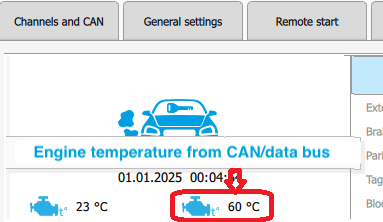
In the Diagnostics tab of StarLine Master, a new icon for engine temperature from CAN/data bus has been added (separate from the icon for engine temperature from the external sensor). If both temperatures (CAN and heater) are available, temperature from CAN will be shown in diagnostics.

[![Eng.png](https://help.starline.ru/uploads/images/gallery/2025-12/scaled-1680-/PGHeng.png)](https://help.starline.ru/uploads/images/gallery/2025-12/PGHeng.png)
#### <span class="nh-number">3. **Added support for the Webasto AT2000STC air heater**</span>

**<span style="color: rgb(23, 43, 77); background-color: rgb(191, 237, 210);"><span class="status-macro aui-lozenge aui-lozenge-success conf-macro output-inline" data-hasbody="false" data-macro-name="status"> E96(V2)</span> <span class="status-macro aui-lozenge aui-lozenge-success conf-macro output-inline" data-hasbody="false" data-macro-name="status">E96V2E90L</span> <span class="status-macro aui-lozenge aui-lozenge-success conf-macro output-inline" data-hasbody="false" data-macro-name="status">GEN7(V2)</span> <span class="status-macro aui-lozenge aui-lozenge-success conf-macro output-inline" data-hasbody="false" data-macro-name="status">M66(V2)</span> <span class="status-macro aui-lozenge aui-lozenge-success conf-macro output-inline" data-hasbody="false" data-macro-name="status">S96(V2) </span></span>**

<span style="color: rgb(23,43,77);"><span style="color: rgb(68,68,68);">Control and monitoring of the launch of Webasto Air Top 2000 STC interior </span></span>air heater via the W-bus have been added.

For connection, you can use the white-black wire or any free LIN wire, switching it to a digital channel.

In the StarLine Master app, assign the option "Webasto preheater control via data bus" to the selected channel.

[![WB preheater control via bus.jpg](https://help.starline.ru/uploads/images/gallery/2025-12/scaled-1680-/wb-preheater-control-via-bus.jpg)](https://help.starline.ru/uploads/images/gallery/2025-12/wb-preheater-control-via-bus.jpg)

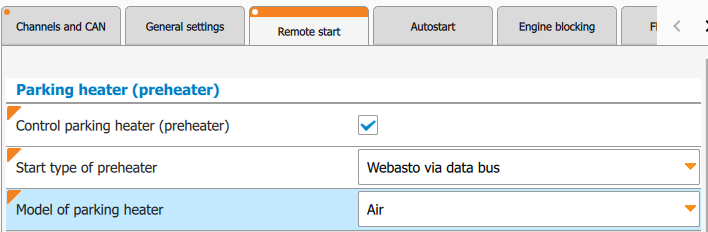
On the "Remote Start" tab, in the "Parking heater (preheater)" section, set "Control parking heater (preheater)." For the "Start type of preheater" select "Webasto via data bus," and choose "Air" as the "Model of parking heater".

[![Parking heater.jpg](https://help.starline.ru/uploads/images/gallery/2025-12/scaled-1680-/parking-heater.jpg)](https://help.starline.ru/uploads/images/gallery/2025-12/parking-heater.jpg)
#### <span class="nh-number">4. **Changed preheater algorithm in <span style="color: rgb(23,43,77);">auxiliary engine heater</span> mode**</span>

**<span style="color: rgb(0, 0, 0); background-color: rgb(191, 237, 210);"><span class="status-macro aui-lozenge aui-lozenge-success conf-macro output-inline" data-hasbody="false" data-macro-name="status"> E96(V2)</span> <span class="status-macro aui-lozenge aui-lozenge-success conf-macro output-inline" data-hasbody="false" data-macro-name="status">E96V2E90L</span> <span class="status-macro aui-lozenge aui-lozenge-success conf-macro output-inline" data-hasbody="false" data-macro-name="status">GEN7(V2)</span> <span class="status-macro aui-lozenge aui-lozenge-success conf-macro output-inline" data-hasbody="false" data-macro-name="status">M66(V2)</span> <span class="status-macro aui-lozenge aui-lozenge-success conf-macro output-inline" data-hasbody="false" data-macro-name="status">S96(V2) </span></span>**

<span style="color: rgb(23,43,77);">The heater in auxiliary engine heater mode now runs continuously (if it exceeds 120 minutes, it restarts after 30 seconds) until the stop condition is met. If the heater was running before engine start, auxiliary engine heater mode will begin 30 seconds after the heater's runtime ends.</span>

<span style="color: rgb(23,43,77);">Settings like "Use parking heater as an auxiliary engine heater", Temperature to start auxiliary heater °C" and "Temperature to stop auxiliary heater °C" are now available in StarLine 2 app.</span>

#### <span class="nh-number">5. **Added a setting for long press of the first button on the tag**</span>  


**<span style="background-color: rgb(191, 237, 210);"><span style="color: rgb(23,43,77);"><span class="status-macro aui-lozenge aui-lozenge-success conf-macro output-inline" data-hasbody="false" data-macro-name="status"> E96(V2)</span> </span><span style="color: rgb(23,43,77);"><span class="status-macro aui-lozenge aui-lozenge-success conf-macro output-inline" data-hasbody="false" data-macro-name="status">GEN7(V2)</span> </span><span style="color: rgb(23,43,77);"><span class="status-macro aui-lozenge aui-lozenge-success conf-macro output-inline" data-hasbody="false" data-macro-name="status">S96(V2)</span> </span><span class="status-macro aui-lozenge aui-lozenge-success conf-macro output-inline" data-hasbody="false" data-macro-name="status">A90BT</span><span style="color: rgb(23, 43, 77); font-size: 14px; letter-spacing: 0px; background-color: rgb(191, 237, 210);"> </span><span class="status-macro aui-lozenge aui-lozenge-success conf-macro output-inline" data-hasbody="false" data-macro-name="status">AS90 </span></span>**

<span class="status-macro aui-lozenge aui-lozenge-success conf-macro output-inline" data-hasbody="false" data-macro-name="status"><span style="color: rgb(23,43,77);">The setting "Anti-hijack mode control" has been changed to "Function of long press of the tag 1st button". Now, in addition to controlling anti-hijack mode, you can set it to stop or start the engine with a long press (long press level 1: press and hold the button until you see two short flashes of the current mode and then one long flash; release the button during the long flash).</span></span><span class="status-macro aui-lozenge aui-lozenge-success conf-macro output-inline" data-hasbody="false" data-macro-name="status"><span style="color: rgb(23,43,77);"> </span></span>

[![General settings.jpg](https://help.starline.ru/uploads/images/gallery/2025-12/scaled-1680-/general-settings.jpg)](https://help.starline.ru/uploads/images/gallery/2025-12/general-settings.jpg)

### Fixed bugs

1. <span style="background-color: rgb(248, 202, 198);">**<span class="status-macro aui-lozenge aui-lozenge-error conf-macro output-inline" data-hasbody="false" data-macro-name="status"> 2.X.X </span>**</span> **<span style="background-color: rgb(191, 237, 210);"><span class="status-macro aui-lozenge aui-lozenge-success conf-macro output-inline" data-hasbody="false" data-macro-name="status"> Е96(V2)</span> <span class="status-macro aui-lozenge aui-lozenge-success conf-macro output-inline" data-hasbody="false" data-macro-name="status">E96V2E90L</span> <span class="status-macro aui-lozenge aui-lozenge-success conf-macro output-inline" data-hasbody="false" data-macro-name="status">GEN7(V2)</span> <span class="status-macro aui-lozenge aui-lozenge-success conf-macro output-inline" data-hasbody="false" data-macro-name="status">S96(V2) </span></span>** A 30-second delay has been added after engine starts, before reading external temperature from the CAN bus for the automatic climate scenario algorithms.
2. **<span class="status-macro aui-lozenge aui-lozenge-error conf-macro output-inline" data-hasbody="false" data-macro-name="status" style="background-color: rgb(248, 202, 198);"> 2.41.0 </span>** **<span style="background-color: rgb(191, 237, 210);"><span class="status-macro aui-lozenge aui-lozenge-success conf-macro output-inline" data-hasbody="false" data-macro-name="status"> Е96(V2)</span> <span class="status-macro aui-lozenge aui-lozenge-success conf-macro output-inline" data-hasbody="false" data-macro-name="status">E96V2E90L</span> <span class="status-macro aui-lozenge aui-lozenge-success conf-macro output-inline" data-hasbody="false" data-macro-name="status">GEN7(V2)</span> <span class="status-macro aui-lozenge aui-lozenge-success conf-macro output-inline" data-hasbody="false" data-macro-name="status">S96(V2) </span> </span>** On the Geely Atlas 2023-2025, when connecting CAN-C, the limit on the number of engine starts between trips stayed active.

<span style="color: #222222;"><span style="font-size: 32.662px;">Known bugs</span></span>

1. No
