# Emergency disarming

System can be fully disarmed with emergency disarm code, indicated on owner ID card, when:

- Tag is lost
- Tag or remote key battery discharged
- Anti hijack mode is activated

![plastic2.png](https://help.starline.ru/uploads/images/gallery/2024-06/plastic2.png ".emergencyfull v2.23.3 > plasticcard1.png")

<div class="page" id="bkmrk--1" title="Page 65"><div class="layoutArea"><div class="column">  
</div></div></div>##### **Emergency disarming with service button**

1. Make sure ignition is switched On.
    
      
    ![on.png](https://help.starline.ru/uploads/images/gallery/2024-06/on.png ".emergencyfull v2.23.3 > 18.png")
2. Push service button or external transceiver button a number of times, equal to the first digit of emergency disarm code.  
    ![push x times.png](https://help.starline.ru/uploads/images/gallery/2024-06/push-x-times.png ".emergencyfull v2.23.3 > 4_1.png")
3. Each digit entry will be confirmed within 3 sec with service button LED flashes in a number equal to a sequence number of corresponding digit entered (1,2, 3 or 4 times).

[![Screen Shot 2025-02-09 at 22.46.35.png](https://help.starline.ru/uploads/images/gallery/2025-02/scaled-1680-/screen-shot-2025-02-09-at-22-46-35.png)](https://help.starline.ru/uploads/images/gallery/2025-02/screen-shot-2025-02-09-at-22-46-35.png)

4\. Repeat 1...2 steps for remaining digits.

5\. Valid code entry is confirmed with 3 flashes and 3 sounds, system turns disarm.

<p class="callout warning">If invalid emergency disarm code is entered 3 times, then next entry shall be blocked for 15 min. Each button push in this interval will be indicated with 5 flashes.</p>

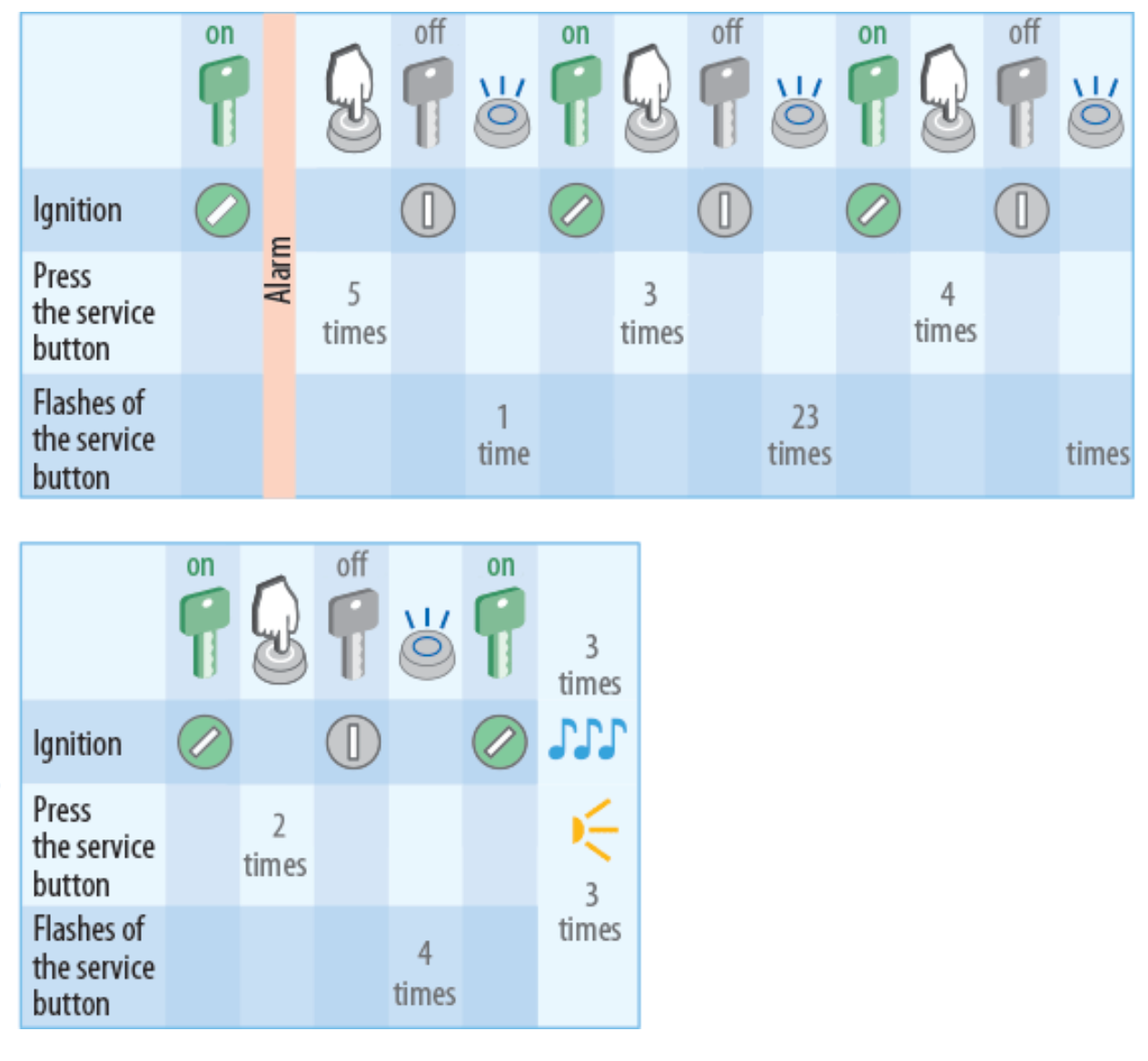
##### **Example of entry the code 5342**

[![Screen Shot 2025-02-09 at 22.50.58.png](https://help.starline.ru/uploads/images/gallery/2025-02/scaled-1680-/screen-shot-2025-02-09-at-22-50-58.png)](https://help.starline.ru/uploads/images/gallery/2025-02/screen-shot-2025-02-09-at-22-50-58.png)
##### **Emergency disarming with SMS text message**

Send SMS text command <span style="background-color: rgb(241, 196, 15);"> <span class="status-macro aui-lozenge aui-lozenge-moved conf-macro output-inline" data-hasbody="false" data-macro-name="status"><span style="color: rgb(0, 0, 0);">30 XXXX</span> </span></span>, where ХХХХ — emergency disarm code from ID card.

### <span style="color: rgb(35, 111, 161);">**Changing emergency disarm code with service button (or external transceiver button)**</span>

1. Switch system in disarmed mode if it is armed.
2. Push service button 4 times.
3. Switch ignition On. 4 LED flashes and 4 sounds shall follow.
4. Entry into code recording will be confirmed with 2 LED flashes and 2 sounds.

<p class="callout warning">If nothing is done withing 5 sec system shall turn Off emergency code recording mode.</p>

5\. Switch ignition Off.  
6\. Switch ignition On and push service button a number of times equal to a first digit of existing emergency disarm code.  
7\. Switch ignition Off. Each digit entry will be confirmed with LED flashes equal to a sequence number of corresponding digit entered (1,2, 3 or 4 times).  
8\. Repeat 6...7 steps for remaining digits.  
9\. Valid existing code entry will be confirmed with 2 LED flashes and 2 beep sounds.  
10\. Switch ignition On. Push service button a number of times equal to a first digit of a new emergency disarm code.  
11\. Switch ignition Off. Each digit entry will be confirmed with LED flashes equal to a sequence number of corresponding digit entered (1, 2, 3 or 4 times).

12\. Repeat 10...12 steps for remaining new code digits.  
13\. A new code entry will be confirmed with 2 LED flashes and 2 beep sounds.  
14\. Enter a new code once again repeating 10...12 steps.  
15\. New emergency disarm code recording will be confirmed with 2 LED flashes and 2 beep sounds.