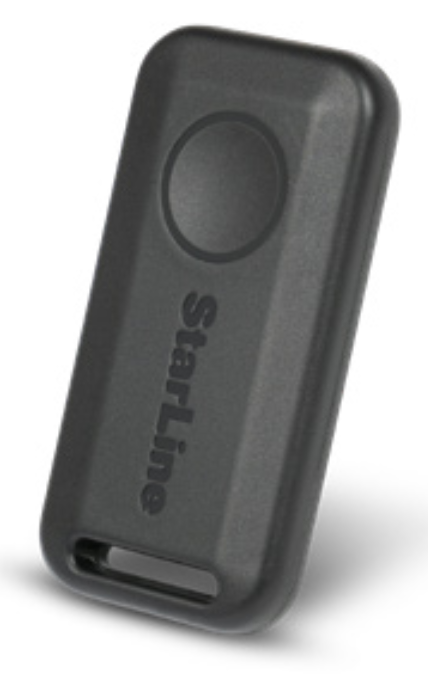
# Control with wireless tag (transponder)

<p class="callout info">Wireless tags availability depends on delivery set</p>

<p class="callout danger">The included and optional tags are supplied from factory in transport (power saving) mode, i.e. inactive! Pushing a tag button in this mode is indicated by green and red alternating flashes of the built-in LED. To switch it to normal mode push a tag button several times until flashing color turns to green</p>

[![Screen Shot 2025-02-06 at 13.36.52.png](https://help.starline.ru/uploads/images/gallery/2025-02/scaled-1680-/screen-shot-2025-02-06-at-13-36-52.png)](https://help.starline.ru/uploads/images/gallery/2025-02/screen-shot-2025-02-06-at-13-36-52.png)

#### <span style="color: rgb(35, 111, 161);">**Connection check**</span>

Push button once to check tag connection status. 2 LED flashes means connection with security main unit established, 1 flash means disconnected. A flash color corresponds to the current active mode:

- green–Regular mode, Anti-hijack is disabled
- red–Anti-hijack mode is enabled
- yellow–Service mode is enabled

#### <span style="color: rgb(35, 111, 161);">**Control over security system**</span>

Duration of a tag button pushing:

- short – push and release button, followed with a flash of corresponding current operation mode;
- long–push and hold button until LED begins flashing.

Duration of long push are of 2 levels:

- 1 level – push and hold button followed with double short
    
    flashes of a current operating mode and then long flash at
    
    which button must be released;
- 2 level – push and hold the tag button followed with double
    
    short flashes of a current operating mode, then one long flash
    
    and then followed with serial flashes at which button must be released

<div class="conf-macro output-block" data-hasbody="false" data-macro-name="include" id="bkmrk-%D0%BA%D0%BE%D1%80%D0%BE%D1%82%D0%BA%D0%BE%C2%A0%E2%80%94-%D0%BD%D0%B0%D0%B6%D0%B0%D1%82%D1%8C-%D0%B8-%D0%BE"><div class="table-wrap"><table class="wrapped confluenceTable tablesorter tablesorter-default stickyTableHeaders" role="grid" style="width: 73.5802%; height: 135.984px;"><colgroup><col style="width: 71.7666%;"></col><col style="width: 28.236%;"></col></colgroup><thead class="tableFloatingHeaderOriginal"><tr class="tablesorter-headerRow" role="row" style="height: 29.7969px;"><th aria-disabled="false" aria-label="Команда: No sort applied, activate to apply an ascending sort" aria-sort="none" class="confluenceTh tablesorter-header sortableHeader tablesorter-headerUnSorted" data-column="0" role="columnheader" scope="col" style="height: 29.7969px;" tabindex="0"><div class="tablesorter-header-inner">**Command**</div></th><th aria-disabled="false" aria-label="Продолжительность нажатия: No sort applied, activate to apply an ascending sort" aria-sort="none" class="confluenceTh tablesorter-header sortableHeader tablesorter-headerUnSorted" data-column="1" role="columnheader" scope="col" style="height: 29.7969px;" tabindex="0"><div class="tablesorter-header-inner">**Button push**</div></th></tr></thead><tbody aria-live="polite" aria-relevant="all"><tr role="row" style="height: 29.7969px;"><td class="confluenceTd" style="height: 29.7969px;">Arm/Disarm</td><td class="confluenceTd align-center" style="height: 29.7969px;">1 short</td></tr><tr role="row" style="height: 46.5938px;"><td class="confluenceTd" colspan="1" style="height: 46.5938px;">Enable / disable Anti-hijack by a tag away

</td><td class="confluenceTd align-center" colspan="1" style="height: 46.5938px;">long 1 level

</td></tr><tr role="row" style="height: 29.7969px;"><td class="confluenceTd" style="height: 29.7969px;">Enable/Disable Service mode</td><td class="confluenceTd align-center" style="height: 29.7969px;">long 2 level

</td></tr></tbody></table>

</div></div>#### <span style="color: rgb(35, 111, 161);">**Replacing a tag battery**</span>

Wireless tag (transponder) is equipped with CR2032 type Li-ion battery.

<p class="callout warning">Tag battery discharging is indicated with 3 sounds of embedded main unit buzzer (or siren) at ignition On. Then battery must be replaced as soon as possible</p>

To replace battery open a tag casing carefully with a flat metal or plastic item, remove discharged battery from slot. Install a new battery in the slot observing correct polarity (positive side up, as shown on picture). Then fix a cover back. Tag is ready for operation.

<span class="confluence-embedded-file-wrapper confluence-embedded-manual-size">![Замена элемента питания 2021.png](https://help.starline.ru/uploads/images/gallery/2023-11/zamena-elementa-pitaniia-2021.png)</span>

A smartphone with support of Bluetooth 4.2 and above can also be used as a tag. See Devices registration article to pair a smartphone as a tag.

<p class="callout info">The smartphone operation as a tag may be limited by operating system restrictions and power saving settings in a particular phone</p>