
Master 2.43.0
Released 03.12.2025
New features
1. Added coolant temperature via data bus from A100 and Webasto heaters
GEN7(V2) AS90 S96(V2) M66(V2)
Mobile app now shows coolant temperature for Webasto Thermo Top Evo 5, A100 HYDRO ECO version 2, and A100 HYDRO D5/G5 Eco V3 heaters. This works via the data bus when the heater is running or the ignition is on.
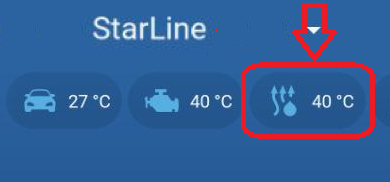
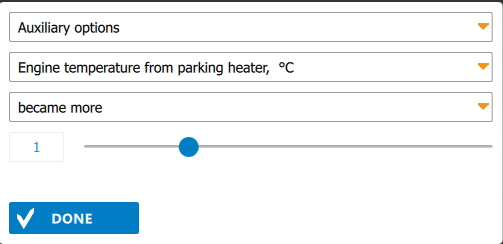
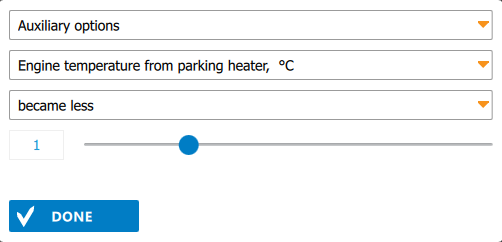
The engine temperature from the heater can now be used in Flexible logic programs as an event or condition.
2. Added transmission of engine temperature from CAN
GEN7(V2) M66(V2) S96(V2)
The system now uses engine temperature from CAN and heater buses. For systems with a built-in GSM or LTE module, the mobile app sends the following temperature values to the server, based on priority:
-
Engine temperature from CAN (if available, enabled in settings, and the CAN bus is active
- Coolant temperature from the preheater via the data bus (available when the ignition is on or the heater is running).
- Temperature from an external sensor in the main unit or the Wireless relay R6.
This temperature, according to the priority above, is used in the following algorithms:
- Heater and auxiliary engine heater are turned on/off based on the lower/upper temperature thresholds.
- Heater is turned off when the engine reaches the maximum allowed temperature.
- Engine is stop (remote/automatic) when the engine reaches maximum allowed temperature.
- Engine temperature is sent to the server if there is a measurement from an external temperature sensor. If the external sensor is not connected, temperature is not sent to the server and is not shown in the mobile app.
If both the temperature sensor and CAN temperature are available, the value from CAN is used, regardless of engine temperature source setting in StarLine Master. If the sensor is not connected, temperature from CAN is used in the listed algorithms.
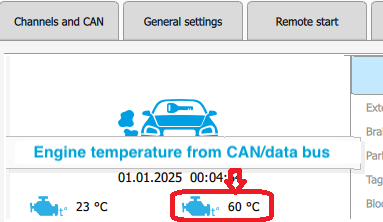
In the Diagnostics tab of StarLine Master, a new icon for engine temperature from CAN/data bus has been added (separate from the icon for engine temperature from the external sensor). If both temperatures (CAN and heater) are available, temperature from CAN will be shown in diagnostics.
3. Added support for the Webasto AT2000STC air heater
E96(V2) E96V2E90L GEN7(V2) M66(V2) S96(V2)
Control and monitoring of the launch of Webasto Air Top 2000 STC interior air heater via the W-bus have been added.
For connection, you can use the white-black wire or any free LIN wire, switching it to a digital channel.
In the StarLine Master app, assign the option "Webasto preheater control via data bus" to the selected channel.

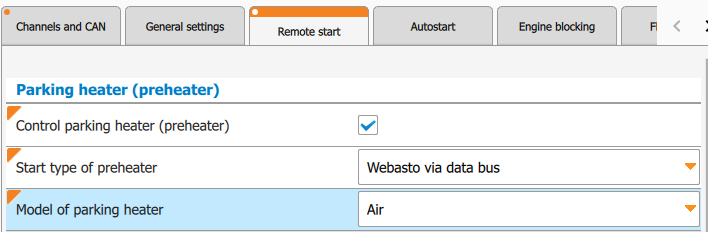
On the "Remote Start" tab, in the "Parking heater (preheater)" section, set "Control parking heater (preheater)." For the "Start type of preheater" select "Webasto via data bus," and choose "Air" as the "Model of parking heater".
4. Changed preheater algorithm in auxiliary engine heater mode
E96(V2) E96V2E90L GEN7(V2) M66(V2) S96(V2)
The heater in auxiliary engine heater mode now runs continuously (if it exceeds 120 minutes, it restarts after 30 seconds) until the stop condition is met. If the heater was running before engine start, auxiliary engine heater mode will begin 30 seconds after the heater's runtime ends.
Settings like "Use parking heater as an auxiliary engine heater", Temperature to start auxiliary heater °C" and "Temperature to stop auxiliary heater °C" are now available in StarLine 2 app.
5. Added a setting for long press of the first button on the tag
E96(V2) GEN7(V2) S96(V2) A90BT AS90
The setting "Anti-hijack mode control" has been changed to "Function of long press of the tag 1st button". Now, in addition to controlling anti-hijack mode, you can set it to stop or start the engine with a long press (long press level 1: press and hold the button until you see two short flashes of the current mode and then one long flash; release the button during the long flash).

Fixed bugs
- 2.X.X Е96(V2) E96V2E90L GEN7(V2) S96(V2) A 30-second delay has been added after engine starts, before reading external temperature from the CAN bus for the automatic climate scenario algorithms.
- 2.41.0 Е96(V2) E96V2E90L GEN7(V2) S96(V2) On the Geely Atlas 2023-2025, when connecting CAN-C, the limit on the number of engine starts between trips stayed active.
Known bugs
-
No