
Operation modes
| Security modes |
Armed |
| Disarmed | |
| Anti-hijack | |
| Alarm | |
| Panic | |
|
Supplementary modes |
«Slave» |
| Hands Free | |
| Service mode | |
| Registration | |
| Configuration |
Armed Mode
The following zones are controlled in armed mode:
- ignition
- shock sensor
- tilt sensor
- motion sensor
If any protected zone is triggered, the system switches to Alarm mode.
System can be armed when ignition off only. If arming command received at ignition on, then only doors are locked
System is armed in one of following ways:
-
pushing tag button once in disarmed or alarm mode
- SMS text command 11
- voice call menu command 11
- command from StarLine mobile app
- command from starline.online web account
- arming with factory security system in Slave mode
-
tag loss or touching capacitive sensor in Hands Free mode
System shall confirm arming with 1 lights flash and 1 siren sound.
Disarmed mode
System is disarmed by one of following ways:
-
pushing tag button once in armed mode
- SMS text command 10
- voice call menu command 10
- command from StarLine mobile app
- command from starline.online web account
-
disarming with factory security system in Slave mode
-
tag detection or touching capacitive sensor in Hands Free mode
Disarming is confirmed with 2 siren sounds and 2 lights flashed. If alarm was triggered while armed mode then 3 siren sounds and 3 lights flashes come up at disarming.
Automatic doors lock on a trip
System can automatically lock doors on a trip on a trip by one of selected terms:
- ignition is switched On
- vehicle starts moving and brake pedal pressed
- parking brake released
- automatic transmission is shifted from parking position
- preset vehicle speed is reached
Automatic doors unlock on a trip
System can automatically unlock doors on a trip by one of selected terms:
- ignition is switched Off
- automatic transmission is shifted to parking position
- engine is stopped
- ignition is switched Off and automatic transmission is shifted to parking positioning
- parking brake is tighten
Automatic doors lock / unlock option can be configured in StarLine mobile app or starline.online account
Trunk unlock in armed mode
Owner can unlock and open trunk by means of a factory remote in armed mode once StarLine tag is visible in detection range.
Unlock trunk in Armed mode" option is configured by installer during setup
Keyless-Go system blocking
The option of factory Keyless-Go blocking via CAN bus secures against factory key stealing and relay attack with specific radio hacking devices. The system shall lock factory Keyless-Go system once StarLine tag is out of detection range. And then unlocks it once tag is detected again in range.
This option is disabled by default and must be enabled in system configuration if needed. Owner authorisation with a tag must be enabled as well. Find out if the option is supported for your vehicle via CAN bus at can.starline.bz
Alarm mode
Alarm shall trigger when any of secured zones is breached in armed mode.
System activates siren alert sound, hazards lights flashing for 30 seconds and notifies owner with phone call, text message, and notification in StarLine2 app. If breached zone is not restored system repeats alert cycle once again.
Any warning zone breaching is followed with 3 lights flashes and 3 siren sounds.
Alarm mode can be aborted in Armed mode with push of a tag button.
Alert methods can be set in mobile app or at starline.online:
- siren and hazard lights
- hazard lights only
- no visual or sound alerts
Siren volume level in Alarm mode can be set in mobile app or starline.online web service, when siren is connected to R6 relay module
The output channel must be set on siren (or horn) control in system configuration with StarLine Master program to enable sound alerts. Siren must be connected through automotive relay 12V or 24V
The maximum number of zone triggering is limited to 8 times within 1 security cycle
Panic mode
Panic mode ensures owner and vehicle security and informs on intrusion attempt. This mode can also be used to easily locate vehicle in a parking lot.
Mode can be activated with text message 19 or a command from StarLine mobile app.
System shall activate siren alert and hazard lights flashing for 10 sec in order to scare an intruder and attract other people attention.
Anti-hijack mode
Anti-hijack mode secures driver against assault attempts on a trip.
The mode is activated either by owner command or by a tag loss on a trip.
Anti-hijack by owner command is activated by one of following ways:
- SMS text message 31
- voice call menu command 31
- command from StarLine mobile app
- command from starline.online personal account
The mode operation algorithm depends on a vehicle speed reading from CAN bus (check on can.starline.ru website)
System enables warning sounds and lights on upcoming engine blocking for 10 seconds. Then by reaching a speed below 30 km/h engine will be safely stopped.
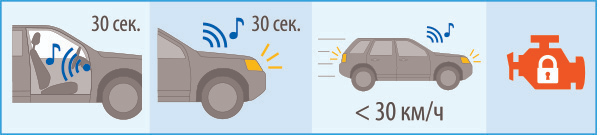
If CAN bus speed reading support is missing, the system will activate warning sounds and lights on upcoming engine blocking for 10 seconds after receiving the command. The engine will be blocked either after 3 minutes or after pressing the brake pedal.
Exit from Anti-hijack mode is done by one of following ways:
- SMS text command 30 XXXX , where XXXX - emergency disarm code
-
entering emergency disarm code using the standard vehicle buttons
- entering emergency disarm code by opening a driver door
-
at starline.online personal account with entering emergency disarm code
In case of invalid emergency disarm code is entered 3 times, then a code entry will be blocked for 15 min and owner will be informed with text message.
Anti-hijack by a tag loss on a trip
The mode operation algorithm depends on a vehicle speed reading from CAN bus.
- Anti-hijack operation sequence when speed supported from CAN bus:
- any of secured zones has been breached (doors, hood or trunk)
- motion sensor has triggered
- in 30 sec system begins seeking for a tag
- in another 30 sec, if a tag has not been detected, system enables warning sound and lights for 10 sec
- by reaching a speed below 30km/h engine will be safely stopped
2. Anti-hijack operation sequence when speed from CAN bus is not supported:
-
any of secured zones has been breached (doors, hood or trunk)
-
motion sensor has triggered
-
in 30 sec system begins seeking for a tag
- in another 30 sec, if a tag has not been detected, system enables warning sound and lights for 10 sec
-
engine will be stopped in 3 min or after pressing the brake pedal
Exit from Anti-hijack mode by a tag loss is made by one of following ways:
- when tag is detected in range
- SMS text command 30 XXXX , where XXXX - emergency disarm code
- disarm command from mobile app or starline.online with entering emergency disarm code
- entering emergency disarm code with vehicle standard buttons*
- entering emergency disarm code by opening a driver door*
Check whether the standard buttons and drive door status are supported for your vehicle in CAN bus at can.starline.bz
In case of invalid emergency disarm code is entered 3 times, then a code entry will be blocked for 15 min and owner will be informed with text message
Anti-hijack by tag loss is disabled by default.
Enable it in device settings through mobile app, or press and hold a tag button until red flash come up, then release the button
Slave mode
Slave mode allows to control security system by means of a factory remote control.
System detects unlocking doors and disarming factory security and waits for owner authorisation with any of below methods before disarming itself:
-
tag detection in range at disarming within adjusted interval from 15 to 60 sec
-
entering personal PIN code with standard buttons at ignition On within adjusted interval from 15 to 60 sec
It is highly recommended to enable above mentioned secondary owner authorization methods in "Slave" mode in system configuration settings
To change the owner authorisation method and wait time, contact your installer
Service mode
Service mode is used for temporary security deactivation and restricting access to system configuration while vehicle maintenance, car wash etc, or when the tag battery is discharged.
Service mode can be activated from disarmed state only
Following features are disabled in service mode:
- arming and disarming
-
doors lock and unlock on a trip
- trunk unlock
- Hands Free mode
- Panic mode
- Anti-hijack by a tag loss
- main unit calibration
- trouble codes in CAN information section
- entry to system configuration
- entry to device registration
Service mode is enabled by any of following ways:
-
tag button push for over 5 sec until the tag's LED turns yellow
- SMS text command 51
- command from StarLine mobile app or starline.online account
Service mode activation is indicated with a tag LED turned yellow.
Service mode is disabled by one of following ways:
-
tag button push for over 5 seconds
- SMS text command 50
- command from StarLine mobile app or starline.online account
After exiting service mode, system switches to disarmed mode and remains in it until tag appears and then disappears from the range
Automatic exit from Service mode
System automatically turns from service mode to owner authorisation when leaving a service area by selected event when ignition on (set in system configuration while installation).
This option requires owner authorisation, embedded sensors and vehicle speed from CAN bus to be enabled in system configuration
Immobiliser mode
Immobiliser mode prohibits drive without an extra owner authorisation.
Depending on settings system waits for owner authorisation with a tag in detection range or PIN code entered with standard vehicle buttons after every disarming or every ignition switching Off and next switching On.
In most of vehicles PIN code can be entered with standard buttons only when ignition is switched On.
If the Immobiliser mode is enabled along with Slave mode, both authorisation conditions must be met to disarm the system
Video recorder (dashcam) control
The option must be initially wired and programmed while installation
System can automatically switch dashcam On to begin recording:
- at ignition switched On – dashcam is activated for 5 min
- at full alarm or warn alarm triggered – dashcam is activated for 2 min
- with SMS command 69 dashcam is activated for 5min
If engine is still running in armed mode then dashcam continues operating until engine is stopped
Emergency braking alert
In case of emergency braking system can alert the other traffic participants by means of hazard lights blinking.
Hazard lights turn off in 5 sec after the end of sudden braking, or beginning of acceleration.
The option is to be set in the system configuration.
The main unit embedded accelerometer must be calibrated for the function proper operation (make sure the corresponding option is enabled in system configuration)